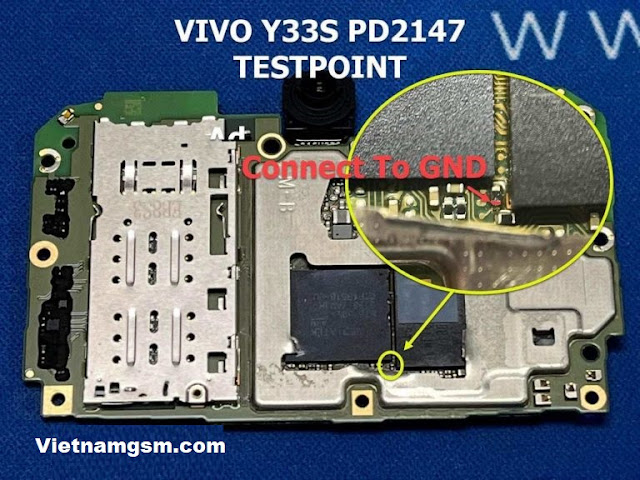
Vivo Y33s TestPoint
April 04, 2022
Naren Dran
If you want to see where the Vivo Y33s TestPoint is, then follow the steps below. Then use them into download mode to perform various functions like installing software, installing custom ROMS/Kernel... You can use Test Point in any box like MRT , UFI, UMT. Vivo Y33s TestPoint Each phone comes with different developer options like Recovery mode, Fastboot mode/bootloader mode, and EDL mode. All these modes use to perform different testing procedures, one of them can only be used for advanced android developer or mobile repair and some of them have can be used by normal users. How to delete pattern and FRP on Vivo Y33s You can use EFT dongle, UMT dongle, octopus FRP tool, MRT to remove FRP and pattern lock from Vivo Y33s or you can try other tools using above test point to boot your phone in download mode. How to find Test Point of Vivo Y33s. Install "Vivo Y33s MTK USB Driver" on windows computer. Remove the back of the device carefully, making sure that you won't damage a...